 Deutsch
 English



A chatbot for WordPress. That really knows your site.
Install the plugin from the official WordPress directory, click “Connect”, done. Paldra reads your pages and answers questions from them. No theme edit, no snippet in the footer, no developer.
More than a chatbot. Your whole support in one system.
Chatbot on your site
Answers questions from your page content, every answer with a source.
WordPress: Services, FAQ, shipping and contact, just as they are on your pages.
Team inbox
Chat, email, WhatsApp and Instagram in one place. Your team takes over a conversation with one click.
WordPress: You join in yourself, the bot steps back, the history stays in one place.
Mail agent
Answers your mailbox from the same content, first as a draft, on its own if you want.
Resolution rate
Shows how many conversations the AI resolved without your team, and where it still needs knowledge.
How it answers. Check first, then speak.
The question
A visitor asks in the chat on your WordPress site.
From your pages
The answer comes from the content it has read from your site, not from a language model’s general knowledge of the world.
Checked
Every statement is checked against your content. Anything that is not covered is removed.


Answer or handover
If nothing backs it, it says it does not know yet and offers to pass the question on to your team.
1click to connect, not one line of code in your theme. How it works
The difference: it does not guess. And it says so openly.
Most chatbots invent an answer when they do not know something – and promise your customer a delivery time or a return window that never existed. Paldra checks every statement against the content it has read from your site and removes anything that is not covered.
Honest rather than inventive. What is not backed by your content, it does not claim. It says that it does not know yet and offers to pass the question on to your team, without making up a reason.
At a glance. What the plugin does.
Paldra reads your public pages, services, FAQ, shipping, contact, and builds a knowledge base from them. You can see it in the dashboard, add to it and have it re-read at any time.
Where Paldra runs. Paldra is operated at Hetzner in Nuremberg. Which providers are used for what is listed in full under Security, the data processing agreement under DPA.
Live in three steps. Without a developer.
The Paldra plugin from the official WordPress directory embeds the chat itself. No access to your theme required, nothing to type out, no keys to copy.
Deactivate it and nothing is left behind. When you disconnect or delete it, the plugin also removes the key it created.
 Setup
In WordPress admin go to Plugins, Add New, search for “Paldra”, install and activate it.
Sign in to Paldra and click “Connect” on the approval page. Nothing to type out, no keys to copy.
The chat shows up on your site. Look, tone of voice and starter questions are set in the Paldra dashboard.
Even more with WooCommerce. Products and order status.
If your site runs WooCommerce, Paldra also reads your products through the same plugin, read-only, and keeps them up to date whenever they change. From plugin version 2.0.0 the chat also answers questions about order status once you agree. Everything about it on the WooCommerce page.
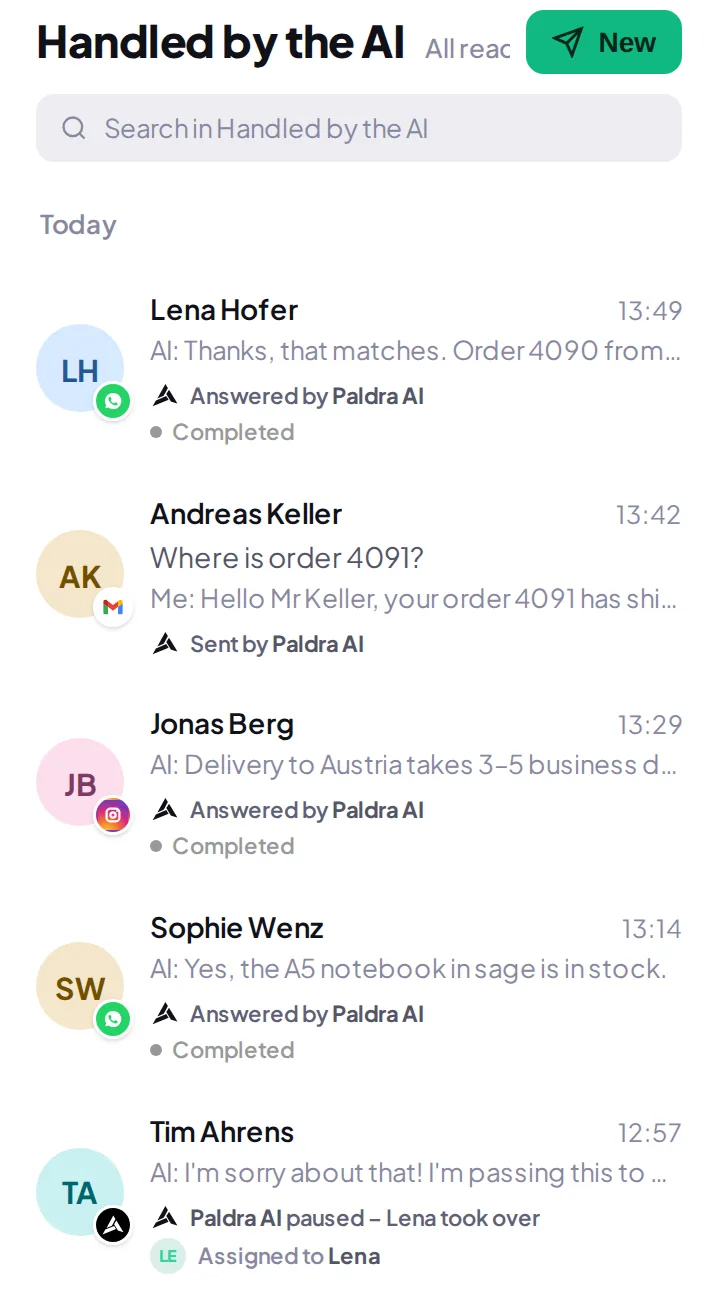
Emails: on the Basic plan Paldra writes the reply on click, from Business it can send it on its own if you want. Image: real Paldra inbox with sample data.
Do I have to change my theme?
No. The plugin inserts the chat itself. No child theme, no snippet, no code.
Where do I get the plugin?
From the official WordPress directory: in WordPress admin go to Plugins, Add New, search for “Paldra”, install and activate it. Then sign in to Paldra and click “Connect” on the approval page.
Does it work with WooCommerce?
Yes. The chat runs on every WordPress page. With WooCommerce, Paldra also reads your products through the plugin, read-only, and from plugin version 2.0.0 answers questions about order status once you agree. More at paldra.com/en/woocommerce.
How does the chatbot know what is on my site?
Paldra reads your public pages and builds a knowledge base from them. You can see it in the dashboard, add to it and have it re-read at any time.
What happens if it does not know something?
It says so – and offers to pass the question on to your team. It invents neither an answer nor a reason.
Where does Paldra run?
Paldra is operated at Hetzner in Nuremberg. Which providers are used for what is listed in full at paldra.com/en/security, and the data processing agreement is at paldra.com/en/dpa.
How do I get rid of it again?
Deactivate the plugin. Nothing is embedded any more, no leftovers in your theme. When you disconnect or delete it, the plugin also removes the key it created.
What does Paldra cost for WordPress?
Try it free for 14 days, no payment method needed. After that from €29 per month. The plans are listed at paldra.com/en/pricing.
One click in WordPress. And your site answers.
14 days free, no payment method needed. After that from €29 per month.
WordPress is a trademark of its owner. It is named only to show what Paldra works with.